ppk2-lib
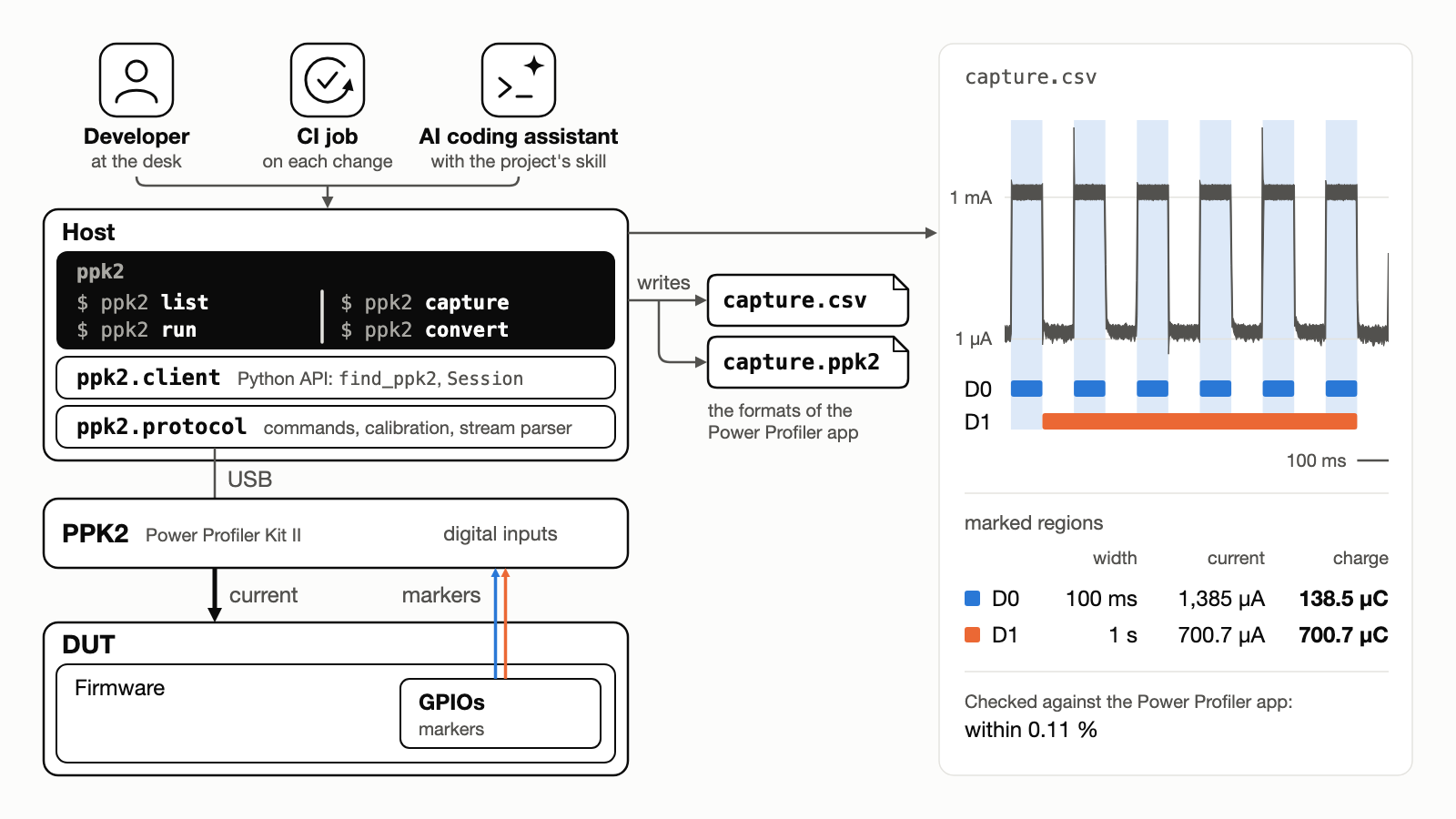
A Python library and command-line tool for Nordic's Power Profiler Kit II (PPK2). The PPK2 measures the current of a device under test (DUT) and samples eight digital inputs with it, 100,000 times per second.
With ppk2-lib, a script, a terminal or a CI job drives the PPK2, without the Power Profiler app.
This is an experimental release (0.1.0). It works and is checked on hardware, but the API may still change between 0.x versions.
Motivation
The Power Profiler app is made for looking at a trace by hand. A power measurement has to be repeated:
- after every change;
- on every variant of a device;
- in CI.
That takes a command and a library, the same ones at the desk and on the test bench, so that a number seen during development is the number the pipeline checks.
The digital inputs make the measurement finer than an average over a capture. When the firmware raises a GPIO around a piece of code, the capture shows when that code ran, to the sample. A script then gives the current and the charge of that region alone: see the recipe.
Command line
$ ppk2 capture --out boot.csv --seconds 3 --source --vdd 3.3
opening session (Source meter mode, vdd=3300 mV)
capturing 3.00 s -> boot.csv (Ctrl-C to stop early)
  [  1.0s]       99329 samples  mean  954.17 µA
  [  2.0s]      199681 samples  mean  826.31 µA
captured 300000 samples over 3.00 s (100037 Hz)
The PPK2 powers the DUT at 3.3 V and switches it on as the capture
starts. boot.csv is a CSV in the format the app exports. A few more
commands:
ppk2 capture --out idle.ppk2 --seconds 30    # a session file in the app's format
ppk2 power on --hold --source --vdd 3.3      # keep the DUT powered until Ctrl-C
ppk2 run --source --vdd 3.3 -- west flash    # power the DUT while it is flashed
Python
from ppk2 import Mode, Session, find_ppk2

with Session.open(find_ppk2().device) as session:
    session.set_mode(Mode.AMPERE)
    session.start_measuring()
    session.power_on()
    session.capture(lambda sample: sample.current_micro_amps < 1000)
capture calls your function for every sample, 100,000 times per
second, and stops when it returns False. Here it stops at the first
sample of 1 mA or more.
Continuous integration
ppk2 run:
- powers the DUT;
- records while a command runs;
- exits with that command's exit code.
So on a runner with the PPK2 and the DUT attached, a test job can record the current of the very run it checks:
A budget is then a few lines over the file:
import numpy as np

ua = np.loadtxt("tests.csv", delimiter=",", skiprows=1, usecols=1)
assert ua.mean() < 2000, f"mean current {ua.mean():.0f} µA is over the budget"
See the recipes for more: the current of one marked piece of code, and comparing two builds.
Contents
This documentation answers four questions.
| Question | Part | Pages |
|---|---|---|
| How do I capture from a terminal? | User guide | Getting started, command reference, recipes, troubleshooting |
| How do I write Python against it? | Developer guide | Architecture, API reference |
| What exactly is measured, and how does one talk to a PPK2? | Measurements | Principle, protocol, file formats |
| Why believe the numbers? | Validation against Nordic's app | Method, results |
If this is your first time, start with getting started.
Use cases
- Sleep and idle currents. The lowest of the PPK2's five measurement ranges resolves 0.2 µA.
- Comparing two firmware builds: capture the same workload before and after a change and compare the files.
- The current of one piece of code: raise a GPIO around it and average the current while the pin is high.
- Powering a DUT from a script, for instance while it is flashed.
- Captures in the app's own formats:
ppk2writes the CSV the app exports and its.ppk2session file.
The recipes show several of these.
Limitations
- Time: one sample lasts 10 µs, so anything shorter is not resolved.
- Accuracy: it is the PPK2's own, which Nordic gives as better than ±20 %. ppk2-lib is checked against Nordic's app, not against a calibrated instrument.
- No voltage: the PPK2 measures current only.
- No chart: to look around a trace by eye, save a
.ppk2file and open it in the app.
Package names
The distribution, which is what you install, is ppk2-lib. The Python
package and the command are both ppk2.
Related projects
- Nordic's Power Profiler app, pc-nrfconnect-ppk. It is the reference for this package: the protocol was read in its source, last checked at v4.4.1, and every result is checked against it.
- The
ppk2skill of Nordic MCP, Nordic's own tooling for AI assistants: a local server through which an assistant drives the kit and shows a live trace. It is made for working with an assistant, while this package is a library and a command for scripts and CI. - IRNAS's ppk2-api-python, another Python library for the PPK2, under GPL-2.0. It is not a reference here, and no code is shared with it.